I had an NVIDIA Jetson Orin Nano sitting around collecting dust, along with a 5-inch touchscreen monitor, and thought it would be fun to build a voice interface for my second brain. Not because I needed one, but because the idea of talking to a device with an oscilloscope-style voice visualization seemed like a cool weekend project.
Why Build a Cyberdeck?#
Honestly, I just thought it would be neat. I had the parts, I had the time, and the concept of a voice-first chat device in a custom enclosure sounded fun to build. I had no productivity goals, no problem to solve, just a project for the sake of building something interesting.
A cyberdeck, for the uninitiated, is a portable computer built into a custom enclosure, often with an integrated keyboard and display. Think of it as a DIY laptop, but built because it looks cool rather than out of any practical necessity. A big part of the appeal is aesthetics; they just look neat. Mine has an oscilloscope display showing audio waveforms while you talk to Matrix rooms through a bluetooth speaker/mic.
The Hardware#
The build uses parts I mostly already had plus a couple of inexpensive additions:
- Compute: NVIDIA Jetson Orin Nano dev kit (8GB). Was not being used. The GPU is handy for running speech-to-text models locally.
- Display: ELECROW 5 Inch Touch Screen Monitor. Another unused part I had on hand. Shows the oscilloscope visualization of voice input.
- Audio: Bluetooth speaker/microphone combo for talking to the device and hearing responses.
- Power: Portable power bank with a USB-C QC PD3.0 Trigger Board Module to power the Jetson and peripherals.
The Completed Build#
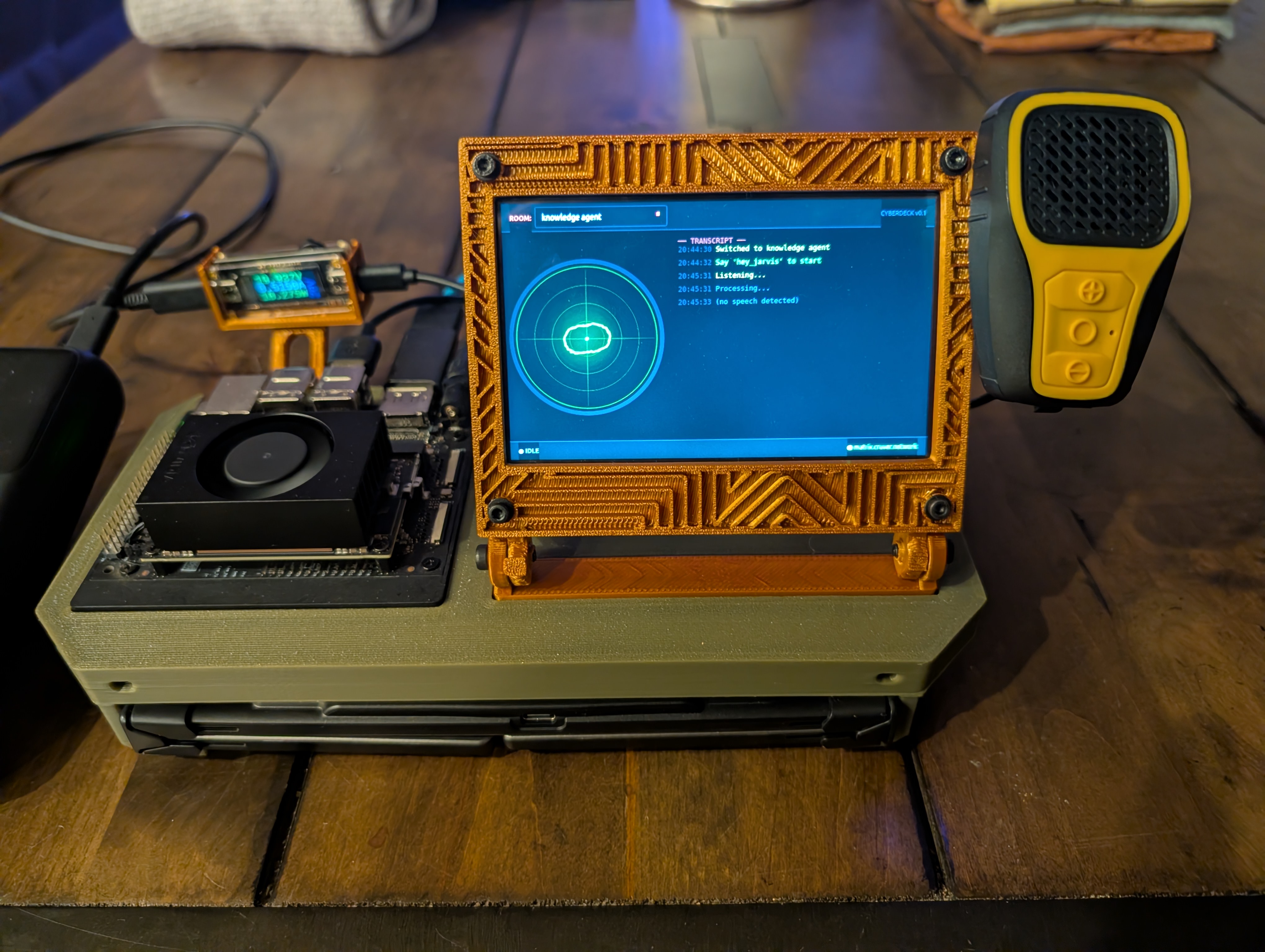
The cyberdeck with the keyboard stowed underneath. You can see the 3D printed enclosure, the oscilloscope display showing voice waveforms, the Jetson Orin Nano on the left, and the bluetooth speaker on the right.
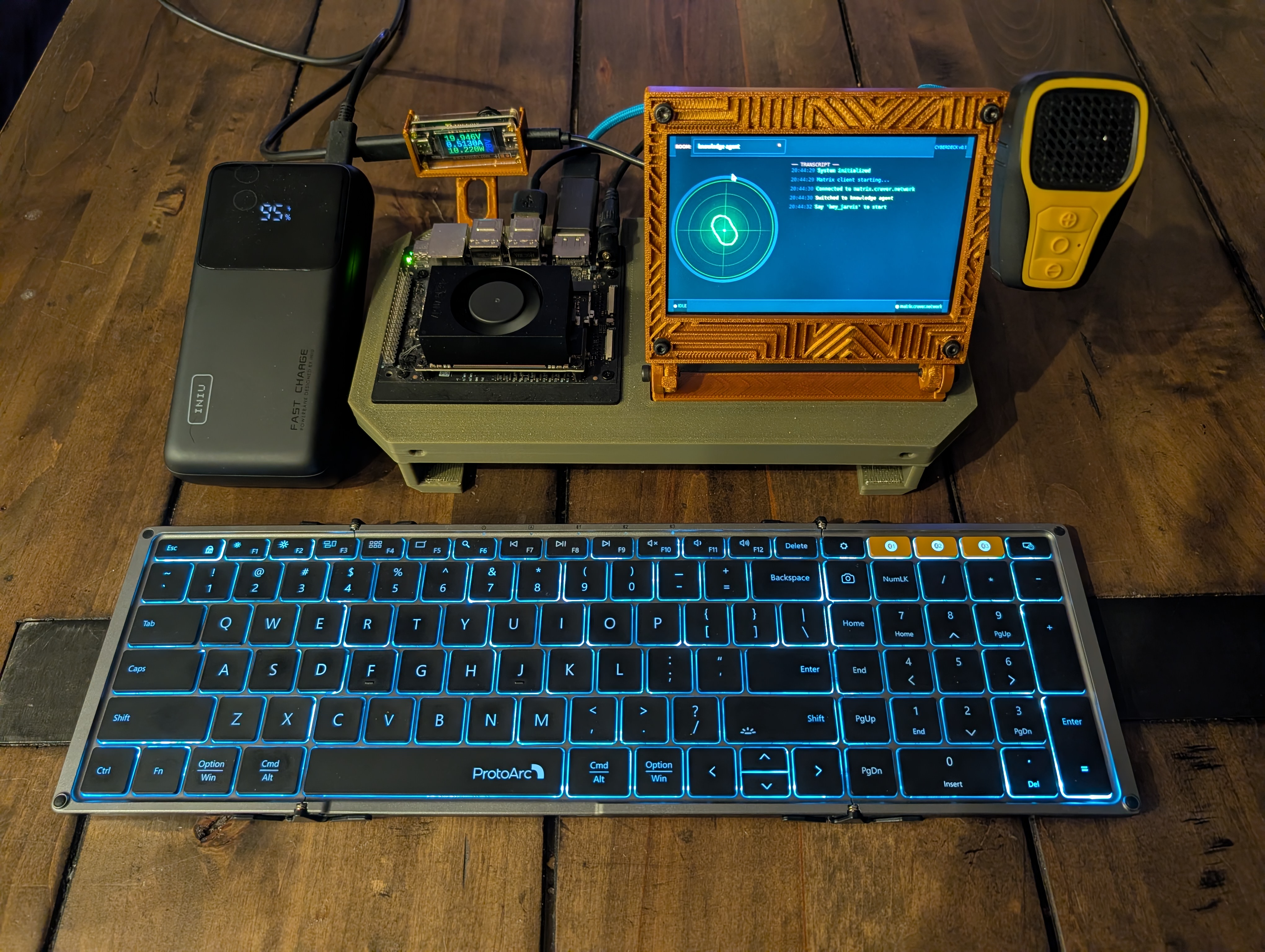
With the keyboard pulled out. The ProtoArc keyboard slides out for when you need to type instead of using voice input.
The Software Stack#
Everything runs locally on the Jetson. The interface features an oscilloscope-style display that visualizes the audio waveforms as you speak.
Operating System and Core Services#
The base is Ubuntu L4T (Linux for Tegra), NVIDIA’s customized Ubuntu for Jetson devices. On top of that:
- Custom Matrix client for chat interface
- Custom oscilloscope visualization for voice input and responses
Voice Pipeline#
The voice system has three main pieces:
- Faster-whisper for speech-to-text, running on the Jetson’s GPU
- Piper for text-to-speech responses
- A custom-developed Matrix client with integrated oscilloscope display
How It Works#
The flow is straightforward:
[Bluetooth Mic Input]
   |
Whisper STT (GPU)
   |
Matrix Client (send/read messages)
   |
Oscilloscope Display (waveform visualization)
   |
Piper TTS --> Bluetooth Speaker Output
You speak into the bluetooth mic, Whisper transcribes it, the custom Matrix client sends or reads messages, the oscilloscope display shows the audio waveforms, and Piper speaks responses back through the bluetooth speaker.
The Matrix Integration#
While this started as a fun build, the Matrix client aspect makes it surprisingly powerful. Matrix is the communication backbone for my homelab infrastructure; it connects my org-roam second brain, health tracking system (via n8n workflows), and other automation. This cyberdeck isn’t just a voice interface to chat rooms. It’s a voice interface to any of my Matrix channels, which means I can speak to interact with my entire personal infrastructure. I can query my second brain, log health data, trigger automations, or just send messages to any room, all through voice.
Current Status#
It’s fully assembled and working. I used FreeCAD to design and 3D print a housing that holds the Jetson Orin Nano, the ELECROW screen, and the USB-C trigger board. The voice pipeline works, the oscilloscope display looks cool, and I can send Matrix messages by talking to it. The only remaining task is adding handles to the enclosure for easier carrying.
I’ll document more as I make progress. Next post will probably cover the oscilloscope visualization and how the voice pipeline actually works once I’ve cleaned up the code.