I own two 3D printers, an Elegoo Centauri Carbon and a Voron, and for a long time I needed three slicers to drive them. PrusaSlicer doesn’t ship settings for my Elegoo. OrcaSlicer does, but it crashes often and generally doesn’t like my PC. Every so often Cura got pulled in too.
The bigger problem was the settings themselves. Both PrusaSlicer and Orca have hundreds of options, and their UIs show you all of them. Most stay at their defaults, so when I want to change one specific thing I end up hunting through tabs, guessing where it lives, and often guessing wrong. Orca also supports a huge number of printers, but it’s somewhat focused on Bambu Lab’s.
So I built deli, a CLI-first slicer front end, and now one tool slices for both of my printers and for nearly 800 of the printers OrcaSlicer knows. Setting a printer up means giving deli its address and letting it ask the printer what it is. A print is a small text file holding only what you changed, so the one setting you care about is never buried under the hundreds you don’t. Getting from a model file to a running print takes two commands. And because every part of it is an ordinary shell command, it works over SSH, on a small computer next to the printer, and in scripts.
A print is a directory#
There’s no GUI and no REPL. You cd into a directory, run commands, and each command edits the print and exits. The print itself is a small file, deli.toml, that lists the parts, which printer, filament and process profiles they’re sliced with, and only the settings you’ve changed from those profiles.
That turns every folder into a printing project, with nothing to save. In a GUI slicer, a plate you’ve arranged is a project file you have to remember to save, name and find again, ideally next to the STLs it was made from. With deli there’s no save step: each command updates deli.toml as it goes, in the same folder as the models. Months later, when I need another set of the same brackets, I cd back into that folder and run deli send --print. The parts and their copies, anything I placed by hand, the printer, filament and process, and every setting I changed are all still there, and the profiles are the same ones it used the first time.

Once a printer is set up, the whole workflow, from a model file to a Benchy printing, is two commands:
deli add 3DBenchy.stl
deli send --print
The printer, filament and process come from my defaults, so I never type them, and deli send slices the print first if it has changed. Everything else is optional: deli slice says how long the print will take and how much filament it uses before anything is sent, and the clip above shows a few more: deli set infill 20% changes a setting (and tells me the process had 15%, so I can see what I overrode), deli pause 40 pauses the print after layer 40 for a filament change, and deli view shows it in the browser. And because the print is a text file, it can go in git, get diffed, or be copied to start the next one.
This is my answer to hunting through tabs. deli set on its own lists only what this print changes, so the two or three things I touched are never lost among the hundreds I didn’t. And when I want to know about one I haven’t touched, I ask for it by name, and deli says where its value comes from:
$ deli set
fill_density = 20%  (the process '0.30mm-standard-elegoo-cc-0.6-nozzle' has 15%)
layer_height = 0.25  (the process '0.30mm-standard-elegoo-cc-0.6-nozzle' has 0.3)
$ deli set temperature
temperature is not changed by this print; the filament 'elegoo-pla-ecc' has 210
deli unset puts a setting back to whatever the profile has.
The rest of what you’d do in a slicer’s window is a command too. deli add 3DBenchy.stl --count 4 prints four, arranged on the bed for you, and a print can hold as many different models as fit. deli supports organic turns on PrusaSlicer’s tree supports, and deli scale 150%, deli rotate 45 and deli move 60 80 place a part where you want it.
Setting up a printer is one command#
The most intimidating part of any new slicer is the first ten minutes: getting it to know your printer. A slicer needs three things before it can do anything: the printer (bed size, nozzle, start and end G-code), a process (layer heights, speeds, infill), and a filament. In a GUI slicer that’s a wizard, a vendor dropdown, and a lot of hoping you picked the right nozzle.
deli doesn’t ship a printer database of its own. OrcaSlicer already maintains a very good one, covering over a thousand printers, so deli converts Orca’s presets on the fly, straight from Orca’s GitHub repository. Orca doesn’t need to be installed.
The printer, though, already knows most of what a slicer needs, so deli asks it. deli setup wants one thing from you, the printer’s hostname or IP address:
deli setup
deli then asks the printer, read-only, what it is. A Klipper printer’s Moonraker reports its nozzle size, bed size, Z travel and kinematics. An Elegoo printer answers its discovery message with its model. OctoPrint and Bambu Lab printers are recognised too. Here’s what that looked like for my Voron, which has a 0.8 mm nozzle:
Its address, a hostname or IP: troodon.cruver.network
Asking troodon.cruver.network what it is...
✓ Klipper (troodon1): 0.8 mm nozzle, 350 x 350 mm bed, 310 mm tall, corexy
   1. Anycubic Kobra S1 Max 0.8 nozzle
   ...
   7. Voron 2.4 350 0.8 nozzle
   8. Voron Trident 350 0.8 nozzle
Which one? 7
✓ Voron 2.4 350 0.8 nozzle
  process   0.40mm Standard 0.8 nozzle @Voron
  filament  Generic PLA @System
  print height lowered to 310 mm, the printer's Z travel
  PRINT_START is given MATERIAL=[filament_type], which your macro reads
  Klipper is told the layer count and the current layer, for Mainsail and Fluidd
✓ deli send sends to moonraker://troodon.cruver.network
Klipper doesn’t say what model it is, so for my Voron deli lists every Orca printer with the same nozzle, bed size and kinematics, and I still pick one. It also fits the profile to the machine: Orca’s Voron profile assumes more Z travel than my printer has, and my PRINT_START macro reads a MATERIAL parameter that Orca’s profile doesn’t pass. The Centauri Carbon was simpler: it said what it was, so the only question left was which nozzle it has, since it doesn’t report that.
Either way, the printer comes in with the process and filament Orca starts it with, its address is saved for deli send, and the first printer you set up becomes the default for new prints. From there, deli add and deli send just work. A printer setup can’t reach is found by name instead, by the model and then the nozzle, and deli vendor lists what Orca has. When I want something other than the defaults, deli filament and deli process with no name list the ones made for the print’s printer, and with a name they choose one.
Presets come from a fixed Orca release rather than whatever is on Orca’s main branch today, and a CI job converts every printer in that release and slices a test cube with each. 789 of the 1,001 do, and the project’s printers page lists every one, along with why the rest don’t. Because deli reads the same release the CI job tested, “this printer slices” on that page means the printer you get.
Once a printer is in your library, it stays as it is. Each print records a hash of the profiles it uses, so a newer deli or a newer Orca never quietly changes a printer that’s working; if a profile does change, deli says so and waits for you to accept it. And since profiles are plain PrusaSlicer INI files, sharing a tuned one is just posting the file somewhere: deli load filament https://... brings it into anyone’s library.
The engine is PrusaSlicer’s#
deli slices with PrusaSlicer’s own engine, libslic3r, the one thousands of people already trust, linked straight into a Python extension module. PrusaSlicer’s slicing capabilities have never been an issue for me, it does everything I need. Installing deli installs the slicer; there’s no separate application to keep in sync. When I compared them, deli’s G-code matched what PrusaSlicer’s own console build produced from the same settings, apart from the timestamp.
The settings files are PrusaSlicer’s INI format too, which means anything PrusaSlicer can describe, deli can slice with.
Seeing what you’re about to print#
A terminal is a bad place to look at a boat, so deli view opens a page in the browser showing the parts on the bed. Once the print is sliced, it shows the toolpaths, coloured by what each line is for, with a slider to go through the layers. The colours get lighter after a pause, so you can see where the filament change lands.
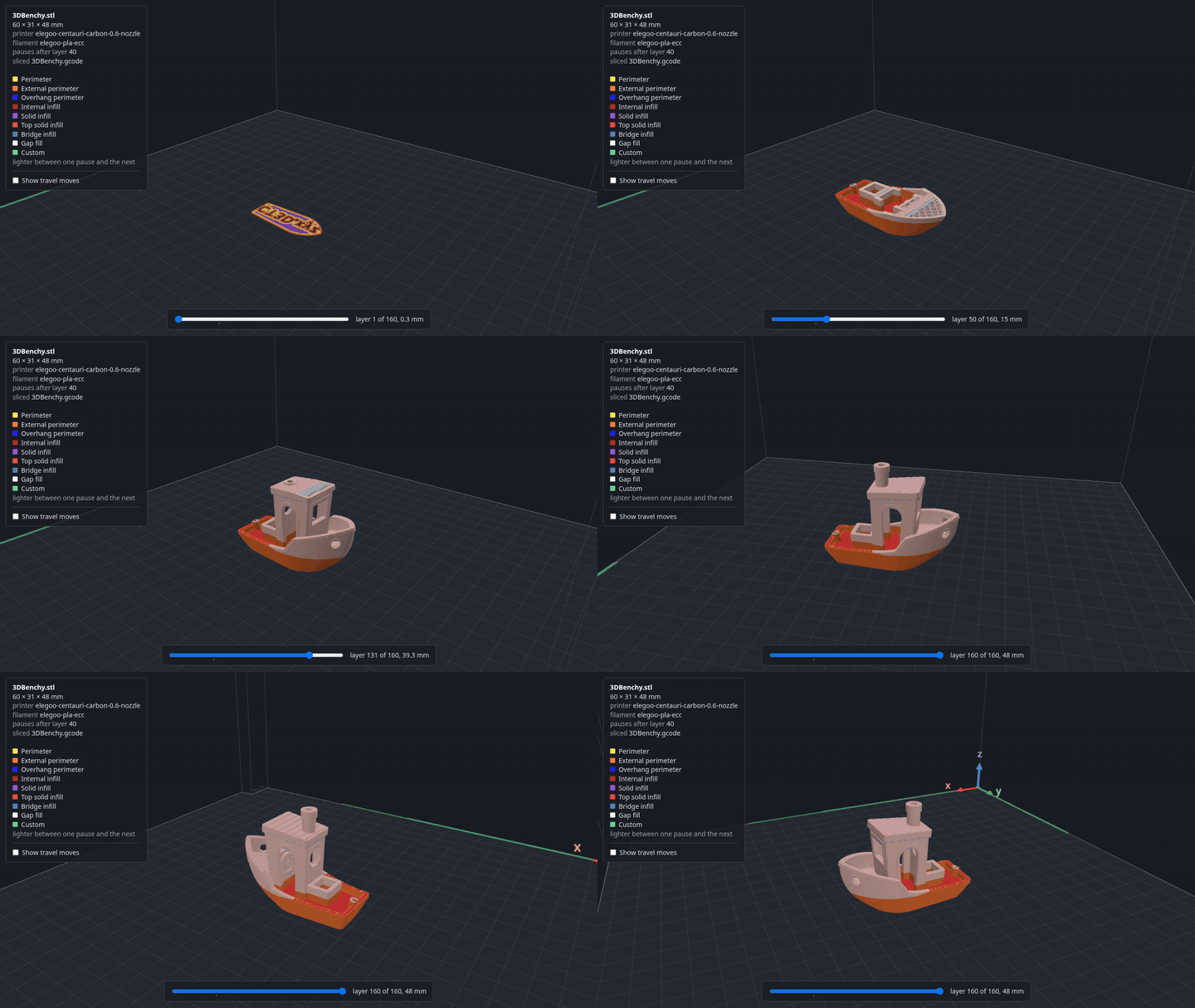
The viewer only displays; everything that changes the print is still a command. It follows deli.toml and the G-code, so re-slicing in the terminal updates the page.
Sending it to the printer#
deli send uploads the gcode to the printer, and deli send --print uploads the G-code and starts the print. It speaks the Elegoo Centauri Carbon’s protocol, plus Moonraker (Klipper) and OctoPrint. The first print was a calibration cube in PLA, and it came out well. The second was a Benchy in PETG-CF with a pause at layer 90. The printer stopped where it was told, parked the head, and carried on when I resumed it. That one came out stringy, but I’m blaming the spool, which needs a long session in the dehydrator.
The Voron has received deli’s G-code too, and Moonraker read it as PrusaSlicer output with the right nozzle, layer height and temperatures. It hasn’t printed it yet, for reasons that have nothing to do with deli.
It’s just the shell#
Because deli is a set of commands rather than a window, everything a shell is good at comes for free.
Tab completion knows deli’s world, not just its commands. It completes Orca’s printer, filament and process names, spaces, @ and all, so deli printer Voron 2.4 350<Tab> offers every nozzle Orca has for it; it completes PrusaSlicer’s setting names after deli set; and it completes the parts of the print in front of you. deli setup installs it for bash, zsh or fish.
It runs where there’s no screen. Over SSH, on a home server or a small computer next to the printer, deli slices and sends just as it does on my desktop. Even the viewer works from there: it’s a web page, so deli view --port 8080 --no-browser on the remote machine and ssh -L 8080:localhost:8080 from mine put it in my browser.
And it scripts. Slicing a whole folder of models, each into a print of its own, is a loop:
for f in *.stl; do
  mkdir -p "${f%.stl}" && (cd "${f%.stl}" && deli add "../$f" && deli slice)
done
Since a print is a directory with a text file in it, it can live in a git repository next to the models it prints, and a change to a print is a diff you can read.
Getting it onto other people’s machines#
A slicer you have to compile for an hour isn’t something anyone else will try. deli is built on GitHub’s machines as a Python wheel with the engine inside, for Linux (x86-64 and ARM64) and macOS (Apple Silicon and Intel). Pushing a version tag builds and tests every platform’s wheel and publishes them as a release, so installing is a matter of picking the wheel for your machine from the releases page and running:
uv tool install <the wheel's URL>On Windows, deli runs in WSL, Windows’ built-in Linux, with the Linux x86-64 wheel installed exactly as above from an Ubuntu terminal, and every release is tested there before it’s published.
What’s not there yet#
I’d rather say what deli hasn’t done than have you find out mid-print:
- Printing, beyond my Centauri Carbon. Slicing isn’t the same as printing well. The Centauri has printed deli’s G-code; the Voron has received it but not printed it; the other printers on the printers page have only sliced a cube.
- Bambu Lab printers can’t be sent to. deli recognises them, and
deli slice -o .writes G-code you can copy over by hand, but it doesn’t speak their network protocols. - Windows is checked by machine, not by person. The WSL tests run on GitHub’s Windows servers, install deli and slice, but only ever talk to fake printers. I don’t use Windows, so sending to a real printer from WSL and the viewer in a Windows browser haven’t been tried. A native Windows wheel needs the viewer’s background server ported first.
- Settings apply to the whole print, not to one part, and a print uses one filament; a colour change is a pause and a swap by hand.
- One plate per print. A folder is one plate, so a project too big for one bed is a folder for each plate for now. Multiple plates in one project are planned.
If you try any of these, I’d like to hear how it went.
Try it#
Pick the wheel for your machine from the releases page, then:
uv tool install <the wheel's URL>
deli setup                  # your printer's address, and tab completion
deli add 3DBenchy.stl
deli send --print
The code is on GitHub at dcruver/deli-slicer, licensed AGPL-3.0 because it links PrusaSlicer’s engine. If you print with something other than a Centauri Carbon, I’d especially like to hear how it went.